













About This Sudoku Generator and How to Use It
A Sudoku generator is a tool that automatically creates Sudoku puzzles based on selected difficulty levels, grid sizes, and layout settings. It allows users to generate printable Sudoku puzzles, worksheets, and puzzle book pages in seconds.
The generator supports multiple Sudoku formats including beginner-friendly 4×4 puzzles, the classic 9×9 Sudoku used in most newspapers and puzzle books, and larger 16×16 grids designed for advanced players who want a more complex logical challenge. Each generated puzzle follows standard Sudoku rules where every number appears exactly once in each row, column, and region.
Everything works directly in your browser, so there is no software to download or install. You can experiment with different puzzle sizes, difficulty levels, and page layouts, instantly preview the result, and regenerate puzzles as many times as needed until the set looks exactly the way you want.
This makes the tool useful not only for casual Sudoku players but also for teachers, printable creators, and authors who produce Sudoku worksheets, activity packs, or complete puzzle book interiors for platforms such as Amazon KDP and other print-on-demand services.
How the Sudoku Generator Works
Creating Sudoku puzzles with this generator takes only a few steps. Choose your puzzle settings, preview the layout instantly, and export clean printable pages when everything looks right.
1. Choose Sudoku Grid Size
Select the grid format you want to generate. The generator supports beginner-friendly 4×4 Sudoku, classic 9×9 puzzles, and larger 16×16 grids designed for advanced players.
2. Set Difficulty Level
Adjust puzzle difficulty from very easy to challenging levels. This allows you to create Sudoku sets for children, casual players, classrooms, or experienced puzzle solvers.
3. Define Puzzle Count
Choose how many puzzles you want to generate. You can create a single Sudoku worksheet or generate large puzzle sets suitable for complete Sudoku books.
4. Control Page Layout
Decide how many puzzles appear on each page and whether solutions should be included. This makes it easy to prepare worksheets, printable puzzle pages, or full book interiors.
5. Preview Instantly
A live preview updates automatically as you change settings. This helps you verify puzzle layout, spacing, and readability before exporting the final pages.
6. Export Printable Files
Download your Sudoku puzzles as PDF, PNG, or SVG. These formats are suitable for worksheets, digital materials, or puzzle books published on platforms like Amazon KDP.
Sudoku Difficulty Levels Explained
The Sudoku Generator supports multiple difficulty levels so you can create puzzles for beginners, casual players, or experienced Sudoku solvers. Difficulty is determined by how many numbers are initially given in the grid and how complex the logical steps are required to complete the puzzle.
Easiest Ever
Extremely beginner-friendly puzzles with many starting numbers. Designed for people who are learning Sudoku for the first time.
Ideal for kids and absolute beginners.
Very Easy
Simple puzzles that can usually be solved with basic scanning and straightforward logical placement.
Good for casual practice and beginners.
Easy
Classic beginner Sudoku difficulty with a balanced number of given numbers in the starting grid.
Suitable for everyday solving.
Easy-Medium
Transitional difficulty that introduces slightly more challenging logical steps.
Good step between easy and medium puzzles.
Medium
Balanced Sudoku puzzles that require multiple logical techniques to complete the grid.
Popular difficulty for most players.
Medium-Hard
Challenging puzzles where logical deductions become more complex and require deeper analysis of the grid.
Suitable for experienced solvers.
Hard
Difficult Sudoku puzzles with fewer starting numbers and more advanced solving paths.
Best for skilled Sudoku players.
Brutal
Extremely challenging puzzles designed for expert Sudoku enthusiasts who enjoy the hardest logical problems.
Maximum difficulty supported by the generator.
Generate Sudoku Sets of Any Size
One of the biggest advantages of this Sudoku Generator is the ability to create large puzzle collections in a single generation run. Instead of producing puzzles one by one, you can generate complete Sudoku sets with dozens or even hundreds of puzzles arranged across multiple pages.
This flexibility makes the generator useful for many different projects. Teachers can create small worksheet sets, printable creators can generate activity packs, and puzzle authors can quickly build complete Sudoku book interiors ready for publishing.
By adjusting the number of puzzles per page and the number of generated puzzles, you can control exactly how large your Sudoku set will be.
Example Layouts for Printable Sudoku Pages
| Puzzles per Page | Total Pages | Total Puzzles | Typical Use |
|---|---|---|---|
| 1 | 50 | 50 | Large-print Sudoku books |
| 4 | 25 | 100 | Standard puzzle books |
| 6 | 20 | 120 | Compact puzzle collections |
| 9 | 15 | 135 | Activity books and worksheets |
Example Sudoku Book Generation Scenarios
| Project Type | Puzzles | Puzzles per Page | Estimated Pages |
|---|---|---|---|
| Classroom Worksheet Pack | 40 | 4 | 10 pages |
| Printable Puzzle Bundle | 80 | 4 | 20 pages |
| Standard Sudoku Book | 120 | 6 | 20 pages |
| Large Sudoku Collection | 200 | 9 | 23 pages |
Because the generator builds puzzles automatically, you can regenerate entire Sudoku sets in seconds until the layout and puzzle count match your project. This makes it especially useful when preparing printable worksheets, downloadable puzzle packs, or full Sudoku interiors for publishing.
Page Layout, Margins, and Page Numbers for Sudoku Books
When creating Sudoku books or printable puzzle collections, page layout becomes just as important as the puzzles themselves. This Sudoku Generator allows you to control page margins, puzzle spacing, and page numbering so your exported files are suitable for professional printing and publishing.
Proper margins ensure puzzles are not placed too close to the page edges or binding area, while page numbering keeps larger puzzle collections organized. These features are especially helpful when preparing Sudoku interiors for print-on-demand platforms such as Amazon KDP or when producing printable puzzle packs.
The generator supports a wide range of common book sizes used in puzzle publishing. These formats are widely used for Sudoku books, activity books, and printable puzzle collections.
Supported Sudoku Book Page Sizes
| Book Size | Width × Height | Typical Use |
|---|---|---|
| Compact Puzzle Book | 5 × 8 | Portable Sudoku books and travel puzzle collections |
| Compact Variant | 5.06 × 7.81 | Smaller puzzle editions and compact interiors |
| Compact Plus | 5.25 × 8 | Compact Sudoku books with slightly larger grids |
| Medium Puzzle Format | 5.5 × 8.5 | Common format for activity books and puzzle collections |
| Standard Sudoku Book | 6 × 9 | One of the most popular formats for Sudoku books on Amazon |
| Standard Variant | 6.14 × 9.21 | Alternative layout close to the classic 6×9 format |
| Large Standard | 6.69 × 9.61 | Larger Sudoku grids and improved readability |
| Large Puzzle Book | 7 × 10 | Comfortable format for medium-to-large puzzle layouts |
| Large Variant | 7.44 × 9.69 | Alternative large format for puzzle interiors |
| Wide Puzzle Layout | 7.5 × 9.25 | Useful when placing multiple puzzles per page |
| Extra Large | 8 × 10 | Large Sudoku grids and easier solving experience |
| Workbook Size | 8.27 × 11.69 (A4) | Worksheets, printable activities, and classroom materials |
Layout Controls Available in the Generator
| Setting | Description |
|---|---|
| Page Margins | Adjust spacing around puzzles to keep grids clear of page edges and binding areas. |
| Puzzles per Page | Control how many Sudoku grids appear on each puzzle page. |
| Solutions per Page | Choose how many solution grids appear on answer pages. |
| Page Numbers | Add automatic numbering for multi-page Sudoku sets and books. |
These layout tools make it possible to move directly from Sudoku generation to a clean printable interior. Whether you are creating worksheets, downloadable puzzle packs, or a full Sudoku book, margins, page numbers, and page size control help keep the final pages consistent and ready for printing.
Printable Sudoku Puzzles
One of the most common uses for a Sudoku generator is creating printable Sudoku puzzles. Instead of searching for pre-made worksheets, you can generate fresh puzzles instantly and export them as printable pages.
Printable Sudoku pages are widely used in classrooms, puzzle books, printable activity packs, and brain training materials. Because the generator allows you to control puzzle density, page margins, and page size, it becomes easy to create worksheets or puzzle collections that fit your exact layout.
- Generate printable Sudoku worksheets for classrooms and home learning.
- Create downloadable Sudoku puzzle packs for websites or online stores.
- Produce printable Sudoku interiors for puzzle books.
- Export puzzles as PDF pages ready for printing.
Because puzzles are generated automatically, you can regenerate entire printable Sudoku sets in seconds until the layout and puzzle count match your project.
Puzzle and Answer Page Layout Options
The Sudoku Generator lets you control puzzle density on puzzle pages and answer pages separately. This allows you to keep puzzles comfortable for solving while making the answer section compact and efficient.
Puzzle Page Density
You can control how many Sudoku puzzles appear on each puzzle page. Larger layouts provide comfortable solving space, while denser layouts allow more puzzles per page when creating worksheets or puzzle books.
1 Puzzle per Page
Maximum puzzle size for comfortable solving. Often used for large-print Sudoku books.
Best for: large grids and beginner-friendly books
2 Puzzles per Page
Balanced layout that keeps puzzles large while fitting two grids on each page.
Best for: readable puzzle books
4 Puzzles per Page
A very common Sudoku book layout. It keeps puzzles readable while allowing a good number of puzzles per page.
Best for: standard Sudoku collections
6 Puzzles per Page
Compact layout used in many puzzle books that increases puzzle density while keeping grids readable.
Best for: medium-density puzzle books
9 Puzzles per Page
High-density puzzle layout that fits many Sudoku grids on each page.
Best for: worksheets and printable packs
12 Puzzles per Page
The most compact puzzle layout available in the generator. Useful when producing very dense puzzle collections.
Best for: high-density puzzle books
Answer Page Density
Answer pages can be much more compact than puzzle pages. The generator allows multiple solution layouts so that large Sudoku books can keep the answer section short while still remaining easy to navigate.
1 Answer per Page
Large solution grids with maximum readability.
Best for: beginner puzzle books
2 Answers per Page
Balanced answer layout with larger grids used in many Sudoku books.
Best for: readable solution pages
4 Answers per Page
A common answer layout used in many Sudoku books.
Best for: standard puzzle collections
6 Answers per Page
Slightly denser solution layout that saves space while keeping answers readable.
Best for: medium puzzle books
9 Answers per Page
Compact answer layout suitable for larger books.
Best for: dense puzzle collections
12 Answers per Page
Higher density answer layout used in long puzzle books.
Best for: compact answer sections
16 Answers per Page
Very dense layout for long Sudoku collections.
Best for: large puzzle books
20 Answers per Page
Highly compact solution layout.
Best for: dense answer sections
25 Answers per Page
Maximum answer density supported by the generator.
Best for: large Sudoku books
To better illustrate how puzzle and answer density work in practice, the example below shows a typical Sudoku book layout. The puzzle pages contain 9 puzzles per page, while the answer section uses a more compact layout with 25 solutions per page. This combination keeps puzzles comfortable to solve while allowing the answer pages to remain short and easy to navigate.
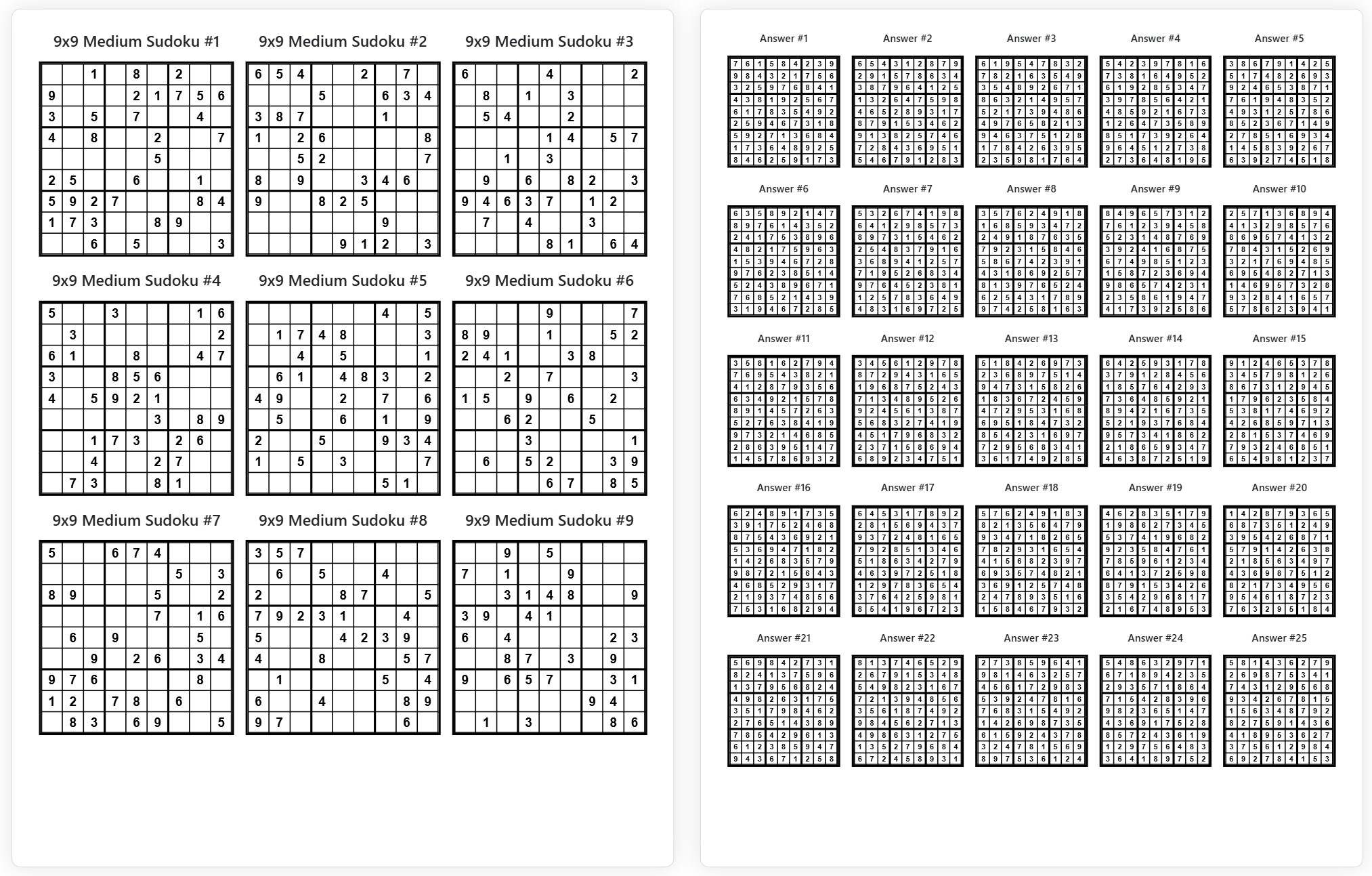
Example Layout
Puzzle pages: 9 puzzles per page · Answer pages: 25 answers per page
With separate controls for puzzle pages and answer pages, the generator makes it easy to design Sudoku worksheets, printable puzzle packs, and full Sudoku book interiors with clean and consistent layouts.
Export Formats: PDF, PNG, and SVG
After generating your Sudoku puzzles and adjusting the page layout, the final step is exporting the puzzles in a format suitable for your project. The generator supports three export formats — PDF,PNG, and SVG. Each format is designed for a different workflow depending on whether you plan to print the puzzles, publish a puzzle book, distribute digital content, or edit the layout in external design tools.
The PDF format is the most universal option. It preserves page structure, margins, puzzle layout, and page numbering exactly as shown in the preview. This makes PDF the best choice for printable worksheets, puzzle collections, and ready-to-publish Sudoku book interiors. If your goal is to generate pages and use them immediately without further editing, PDF is usually the fastest and simplest workflow.
Image and vector formats provide more flexibility when you want to integrate Sudoku puzzles into other materials. PNG export produces high-resolution images that are easy to place in websites, documents, presentations, or printable downloads. SVG export goes even further by providing vector graphics that can be edited in professional design tools such as Adobe Illustrator, Inkscape, or Affinity Designer. With SVG, puzzle grids remain perfectly sharp at any size and can be recolored, resized, or combined with custom layouts.
Comparison of Export Formats
| Format | Main Characteristics | Typical Use Cases | Advantages |
|---|---|---|---|
| Complete multi-page document that preserves page layout, margins, puzzle density, and page numbering exactly as generated. | Puzzle books, printable Sudoku worksheets, activity books, and interiors for publishing platforms such as Amazon KDP. |
| |
| PNG | High-resolution raster image export where each page becomes a standalone image file. | Websites, blogs, printable downloads, educational materials, and digital puzzle content. |
|
| SVG | Vector graphics format where puzzle grids are built from scalable shapes instead of pixels. | Graphic design workflows, custom layouts, professional puzzle book formatting, and branding projects. |
|
Because the generator supports all three formats, you can choose the workflow that best fits your project. Many creators export Sudoku puzzles as PDF for printing or publishing, while designers and content creators often prefer PNG or SVG when they want additional freedom to integrate puzzles into custom layouts, educational materials, or digital content.
Create Sudoku Puzzle Books for Amazon KDP
One of the most common uses for this Sudoku Generator is creating complete Sudoku puzzle books. Because the generator can produce large sets of puzzles and export them as structured multi-page documents, it becomes possible to generate entire puzzle book interiors in minutes instead of building them manually.
Authors publishing on platforms such as Amazon Kindle Direct Publishing (KDP) often need hundreds of puzzles arranged across multiple pages followed by a compact answer section. With the generator you can control puzzle density, page margins, and answer layouts so the final PDF resembles a professionally formatted puzzle book.
Instead of designing each page individually, the generator creates consistent Sudoku grids automatically. This makes it much easier to prepare interiors for puzzle books, activity books, and printable puzzle collections.
Typical Sudoku Book Structure
- Puzzle pages — the main section of the book where readers solve Sudoku puzzles. Layouts usually contain between 1 and 9 puzzles per page depending on grid size and page format.
- Answer pages — a compact section placed at the end of the book that contains solutions for all puzzles. Answer pages often include 9 to 25 solutions per page to keep the answer section short.
- Consistent page layout — margins, puzzle spacing, and page numbering remain consistent across the entire book to produce a clean and professional printed result.
With automatic puzzle generation and flexible layout controls, the generator helps reduce hours of manual formatting work. Whether you want to create a small Sudoku booklet or a large puzzle collection, the workflow remains simple: generate puzzles, preview the layout, and export a clean interior ready for publishing.
Who This Sudoku Generator Is For
Although Sudoku puzzles are widely enjoyed as a casual brain game, a reliable Sudoku generator can be useful for many different types of projects. Because puzzles can be generated in large quantities and exported in multiple formats, the tool works well for both educational and publishing workflows.
- Teachers and homeschool educators who create printable Sudoku worksheets for classroom activities, logic training, and math practice.
- Puzzle book authors who need to generate large Sudoku collections for puzzle books, activity books, and printable puzzle packs.
- Content creators who publish puzzles on websites, blogs, or digital learning platforms.
- Designers and publishers who integrate Sudoku puzzles into magazines, educational materials, and printed activity books.
- Sudoku fans who simply want to generate fresh puzzles to solve or print for personal practice.
Because the generator combines puzzle creation, page layout control, and multiple export formats, it can adapt to many different workflows ranging from quick printable worksheets to full Sudoku puzzle books.
Sudoku Rules
Sudoku is a logic puzzle where numbers must be placed in a grid according to a simple set of rules. Despite its simple structure, Sudoku can create a wide range of logical challenges depending on puzzle difficulty.
- Each row must contain every number exactly once.
- Each column must contain every number exactly once.
- Each sub-grid or region must contain every number exactly once.
- No number may repeat within the same row, column, or region.
A Sudoku puzzle starts with some numbers already placed in the grid. The goal is to logically fill the remaining cells while following these rules until the entire grid is complete.
Why Use an Online Sudoku Generator
Creating Sudoku puzzles manually is possible, but it quickly becomes time-consuming when you need large collections of puzzles or consistent layouts across many pages. An online generator automates the entire process and allows you to move from puzzle idea to finished printable pages much faster.
Automatic Puzzle Generation
Generate complete Sudoku grids instantly without constructing puzzles manually.
Useful for producing large puzzle collections quickly.
Consistent Page Layout
All puzzles follow the same layout, margins, and spacing across every generated page.
Important for worksheets and puzzle books.
Flexible Puzzle Density
Choose how many puzzles appear on each page depending on the desired layout.
Supports layouts from 1 to 12 puzzles per page.
Automatic Answer Pages
Solutions are generated automatically so you don't need to solve puzzles manually.
Helps create compact answer sections.
Multiple Export Formats
Export puzzles as PDF, PNG, or SVG depending on how you plan to use the content.
Suitable for printing, publishing, or digital use.
Fast Puzzle Creation Workflow
Generate puzzles, preview the layout, and export the finished pages within minutes.
Ideal for worksheets, printables, and puzzle books.
Frequently Asked Questions About Sudoku Generators
If you are new to Sudoku puzzle generators or planning to create printable puzzles or puzzle books, the following questions cover some of the most common topics users ask about.
- Can I create printable Sudoku puzzles with this generator? Yes. The generator can export Sudoku puzzles as printable pages, including puzzle pages and answer sections arranged across multiple pages.
- Does the generator include solutions for the puzzles? Yes. Solutions are generated automatically and can be placed on separate answer pages with different answer densities.
- Can I use generated puzzles for Sudoku books? Yes. Many creators use Sudoku generators to build puzzle book interiors. By adjusting puzzle density, margins, page numbering, and export format, it is possible to generate complete Sudoku book layouts.
- What Sudoku grid sizes are supported? The generator supports several Sudoku formats including beginner grids and larger grids designed for more advanced puzzle solving.
- Do I need to install software to generate Sudoku puzzles? No installation is required. The generator works directly in your browser, allowing you to create, preview, and export puzzles online.
These features make the Sudoku generator suitable for worksheets, printable puzzle packs, educational materials, and complete Sudoku puzzle book interiors.
How to Start Creating Sudoku Puzzles with This Generator
Creating Sudoku puzzles with this generator takes only a few steps. You can configure the grid, preview the layout, and export ready-to-use puzzle pages in just a few minutes.
- Choose the Sudoku grid size you want to generate. The generator supports beginner-friendly grids as well as classic and advanced Sudoku formats.
- Select the difficulty level and decide how many puzzles you want to generate in a single batch.
- Choose how many puzzles should appear on each page and how many answers should appear on the solution pages.
- Adjust page layout settings such as margins, page numbering, fonts, and visual styling.
- Preview the generated puzzles to make sure the layout looks the way you want.
- Export the finished puzzle pages as PDF, PNG, or SVG depending on how you plan to use them.
With these steps you can quickly generate printable Sudoku puzzles for worksheets, puzzle packs, classrooms, or complete Sudoku book interiors ready for publishing.