













Sudoku Export Options – Printable, PDF, PNG, SVG, and Book Layouts
This Sudoku export hub covers all major ways to export Sudoku puzzles for real-world use. Whether you need printable Sudoku pages, Sudoku PDF export, or image formats like PNG and SVG, this section helps you understand how to turn generated puzzles into structured output.
These export options are designed for users creating printable Sudoku worksheets, puzzle books, classroom materials, and downloadable puzzle packs. Each format supports a different workflow, from simple printing to full Sudoku book layout preparation.
Printable Sudoku Pages
Create printable Sudoku puzzles formatted for clean page output. Ideal for worksheets, handouts, and printable puzzle sets.
Sudoku PDF Export
Export Sudoku puzzles as PDF files ready for printing, sharing, or assembling into Sudoku books and collections.
Sudoku PNG Export
Generate Sudoku images in PNG format for websites, social media, and downloadable puzzle packs.
Sudoku SVG Export
Use vector-based Sudoku export (SVG) for high-quality print layouts and scalable puzzle designs.
With Answers / Without Answers
Control whether your Sudoku export includes answers or creates separate solution pages for books and worksheets.
Page Layout and Margins
Configure Sudoku page layout, margins, and spacing for print-ready puzzle pages and professional formatting.
Page Numbers and Structure
Add page numbers and structure to create organized Sudoku books and printable collections.
Book and Worksheet Output
Prepare Sudoku puzzles for books, worksheets, and classroom use with consistent formatting and scalable export options.
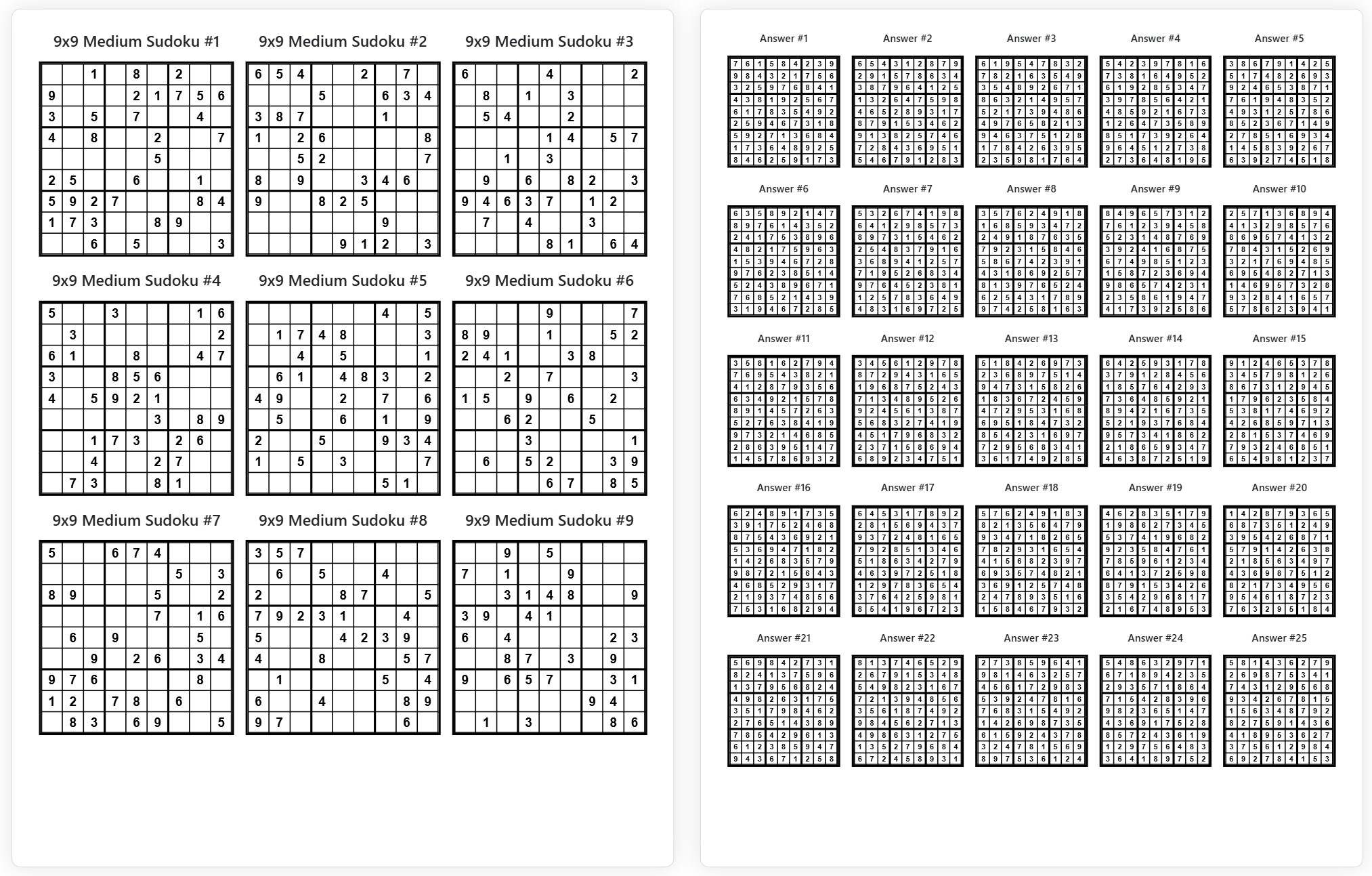
Sudoku Export Layout Preview
This preview shows how Sudoku puzzles can move from a generated grid into printable pages, PDF-ready layouts, answer sections, and puzzle-book formatting.
How Sudoku Export Works – From Grid to Printable Output
Exporting Sudoku puzzles is not just about downloading a grid. It is a structured workflow that turns a generated puzzle into a print-ready Sudoku page, PDF document, or book layout. This process ensures that puzzles are formatted correctly for real use beyond the browser.
Whether you want to export Sudoku to PDF, create printable Sudoku worksheets, or prepare puzzles for books and collections, the export flow follows a clear sequence of steps.
| Step | Action | Result |
|---|---|---|
| 1 | Generate Sudoku puzzle | Create a Sudoku grid with the desired size, difficulty, and structure. |
| 2 | Select export format | Choose between PDF, PNG, SVG, or printable layout depending on your output goal. |
| 3 | Configure layout and settings | Adjust margins, spacing, page structure, and answer inclusion for clean formatting. |
| 4 | Prepare print-ready output | Convert the Sudoku grid into astructured printable page or document layout. |
| 5 | Export and use | Download the file or use it forprinting, worksheets, puzzle books, or distribution. |
This workflow ensures that Sudoku puzzles are not only generated but also properly formatted for real-world use cases such as printing, publishing, and creating structured puzzle content.
Why Sudoku Export Matters – From Puzzle to Real Output
Generating a Sudoku puzzle is only the first step. A raw grid on screen is not enough when you need printable Sudoku pages, structured PDF documents, or complete puzzle book layouts. This is where Sudoku export becomes essential.
A Sudoku export workflow transforms a simple grid into a formatted output that can be printed, shared, or published. It allows you to control layout, spacing, answers, and page structure so the final result is usable outside the browser.
From Generator to Printable Product
Without export, Sudoku remains a digital-only puzzle. With export, it becomes a print-ready Sudoku worksheet, a downloadable PDF, or part of a Sudoku book. This shift is what turns puzzle generation into a complete production workflow.
Built for Real Use Cases
Sudoku export is designed for real-world scenarios such as printing puzzles at home, creating classroom materials, assembling printable packs, and preparing structured puzzle collections for distribution or publishing.
Whether you need a Sudoku printable, a Sudoku PDF export, or a fully formatted puzzle layout, export functionality ensures your puzzles are ready for practical use.
Sudoku Export Use Cases – Books, Worksheets, Printables, and More
Sudoku export is used in many real-world scenarios where puzzles need to be printed, shared, or published. Instead of keeping Sudoku grids on screen, export allows you to create structured outputs for different purposes.
- Create Sudoku books for Amazon KDP with formatted pages, margins, page numbers, and answer sections ready for publishing
- Generate printable Sudoku worksheets for classrooms, homework, and educational materials
- Build downloadable Sudoku puzzle packs for websites, online stores, and digital products
- Export Sudoku puzzles to PDF for easy printing, sharing, and distribution
- Create Sudoku printables for Etsy and other marketplaces as ready-to-sell digital downloads
- Prepare activity books and puzzle collections with consistent layout and structured formatting
- Use Sudoku export for classroom materials, including worksheets, test sheets, and practice sets
- Generate Sudoku images (PNG, SVG) for web publishing, blog posts, and social media content
These use cases show how Sudoku export moves beyond simple puzzle generation and becomes a tool for content creation, publishing, and print-ready production.
Whether you are building a Sudoku book, creating printable worksheets, or selling digital puzzle products, export functionality provides the structure needed for real-world applications.
Sudoku Export Formats and Output Types
Sudoku export supports multiple output formats depending on how you plan to use your puzzles. Choosing the right format helps ensure that your Sudoku pages are suitable for printing, publishing, or digital distribution.
Whether you need Sudoku PDF export, image formats like PNG or SVG, or structured printable Sudoku layouts, each format serves a specific purpose in the export workflow.
PDF Export for Printing and Books
Sudoku PDF export is the most common option for creating print-ready puzzles. It is ideal for Sudoku books, printable worksheets, and downloadable puzzle files that can be shared or printed easily.
PNG Export for Images and Digital Use
Sudoku PNG export creates image-based puzzles that can be used on websites, blogs, and social media. It is useful when you need a quick visual format rather than a structured document.
SVG Export for High-Quality Print Layouts
Sudoku SVG export provides scalable vector output, which is perfect for high-resolution printing and professional layouts. SVG files keep sharp edges and clean lines at any size.
Printable Layouts and Page Structure
Printable Sudoku layouts focus on page formatting, including margins, spacing, and puzzle positioning. This is important when creating worksheets, activity sheets, or book-ready pages.
Answer Pages and Solution Output
Export options also include Sudoku with answers or separate solution pages. This is essential for worksheets, books, and structured puzzle collections.
By combining these formats, you can build complete Sudoku outputs that are ready for printing, sharing, or publishing without additional formatting steps.
Create Sudoku Books and Print-Ready Layouts
Sudoku export becomes especially powerful when used for creating Sudoku books and structured printable collections. Instead of working with single puzzles, you can generate and export multiple grids into consistent layouts ready for publishing.
This is commonly used for Amazon KDP Sudoku books, printable puzzle collections, and activity books where formatting, spacing, and structure must remain consistent across all pages.
Layout Control for Book Production
When preparing Sudoku for books, layout settings become critical. Export tools allow you to control margins, spacing, puzzle positioning, and page density so every page looks clean and professional.
Page Numbers and Structured Flow
Adding page numbers and consistent structure helps transform a set of puzzles into a real Sudoku book layout. This is important for navigation, usability, and publishing standards.
Answer Pages and Puzzle Organization
Export options support Sudoku with answers and separate solution sections. This allows you to organize puzzles and answers properly, which is essential for books and worksheets.
Ready for Publishing and Distribution
With proper export settings, Sudoku puzzles can be turned into print-ready PDF files suitable for publishing, selling, or sharing. This includes formats used for KDP books, printable downloads, and educational materials.
This makes Sudoku export not just a utility feature, but a complete workflow for creating, formatting, and publishing puzzle content.
Frequently Asked Questions About Sudoku Export
Can I export Sudoku puzzles for printing?
Yes, you can export Sudoku puzzles for printing in formats designed for clean page output. This includes printable layouts suitable for worksheets, handouts, and puzzle collections.
Can I export Sudoku to PDF?
Yes, Sudoku PDF export allows you to create print-ready documents that can be downloaded, shared, or used for books and printable materials.
What formats are supported for Sudoku export?
Sudoku export supports multiple formats including PDF, PNG, SVG, and printable page layouts, depending on how you plan to use your puzzles.
Can I create Sudoku books with export tools?
Yes, you can use export features to build Sudoku books with structured layouts, page numbers, margins, and answer sections suitable for publishing.
Can I export Sudoku with answers?
Yes, you can export Sudoku with answers or create separate solution pages, which is useful for worksheets, books, and structured puzzle collections.
Is Sudoku export suitable for classroom use?
Yes, Sudoku export is ideal for creating printable worksheets, practice sheets, and educational materials for classroom and home learning.
Can I export multiple Sudoku puzzles at once?
Yes, export tools can be used to generate and export multiple Sudoku puzzles in a single structured layout, which is useful for books and printable packs.
Can I control margins and page layout?
Yes, you can adjust margins, spacing, and layout settings to create clean, print-ready Sudoku pages for different formats and uses.
Sudoku Export Hub – Complete Workflow for Print and Publishing
This Sudoku export hub brings together all tools needed to transform Sudoku puzzles into print-ready output, PDF documents, and structured layouts for real-world use. Instead of working with isolated grids, you can build complete puzzle sets ready for printing, sharing, or publishing.
With support for printable Sudoku pages, Sudoku PDF export, image formats, and layout customization, this page covers everything required to move from puzzle generation to final output.
Whether you are creating Sudoku worksheets, preparing puzzle books, or building downloadable Sudoku collections, export functionality ensures your puzzles are clean, consistent, and ready to use.
The combination of export formats, layout control, and structured workflows makes this page a central solution for Sudoku printing, publishing, and content creation.
Works on mobile, tablet, and desktop devices without installation, making it easy to generate and export Sudoku puzzles from anywhere.