


Stroop test: colour-word interference and the meaning of your result
Explore the conflict between a printed colour word and its ink, then learn how this forty-trial version compares accuracy and response times without assigning a diagnostic label.
By PuzzleGenerator.org · Updated
| Familiarisation | 4 unscored colour trials |
|---|---|
| Scored run | 40 trials: 20 matching and 20 conflicting |
| Response | Name the ink colour, not the printed word |
| Comparison | Accuracy and correct-response median for each condition |
How to take this online Stroop test
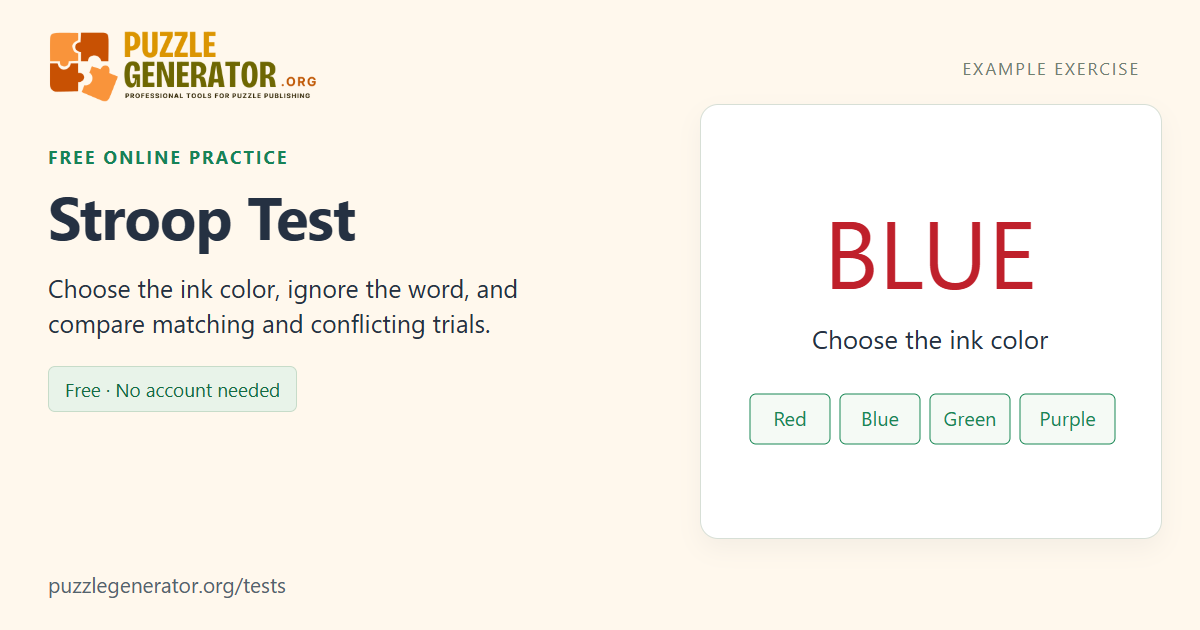
Choose the ink color, not the meaning of the displayed word. The answer buttons stay in the same order: Red, Blue, Green and Purple. You can click, tap, or press keys 1–4. A short four-color familiarisation comes before the scored run. The 40 scored trials contain 20 matching pairs and 20 conflicting pairs, with each ink color shown ten times overall. A response moves straight to the next trial without correctness feedback; all answers appear in the final review.
How the matching and conflicting trials are scored
Each correct ink-color choice earns one point. Correct-response median times are calculated separately for matching and conflicting pairs. The interference difference is the conflicting median minus the matching median; it can be negative in a short run. We show that difference only when both conditions have at least four correct responses. Errors remain visible and are not included in response-time medians. These are browser response measurements, not population percentiles.
Use words you can read fluently and colors you can distinguish. The current word set is English. Screen refresh, device latency, reading fluency and input method affect results. Hiding or leaving the page interrupts an unfinished run without saving it. This is an educational adaptation, not a clinical Stroop assessment or an ADHD test.
What is the Stroop effect?
A printed word can suggest one answer while its ink suggests another. If BLUE appears in red, reading the word points towards blue, but the instruction asks for red. The Stroop task makes this conflict explicit by asking you to identify the ink while disregarding the word’s meaning. Matching trials remove that particular conflict, such as BLUE printed in blue.
The task takes its name from J. Ridley Stroop’s research on interference in verbal responses. This page is a browser practice adaptation, not a reproduction of a standard clinical instrument. Its fixed answer buttons, keyboard shortcuts, trial count and timing are part of this implementation. Results from a different task format, including a timed sixty-second game, should not be treated as interchangeable with its forty-trial score.
Why there are matching and conflicting colour-word pairs
The scored run contains twenty trials in each condition. Within each condition, every ink colour is used five times. Matching pairs have the same word and ink; conflicting pairs use different ones. The sequence is shuffled, and the answer positions remain fixed. A short familiarisation first lets you try the four colours and controls without adding a record to scored history.
This comparison asks a more specific question than whether you were fast overall: how did your responses differ between these two kinds of trial? It is important to keep both accuracy and time visible. A run with rapid incorrect choices is not the same as a run with rapid correct choices. The results therefore do not collapse everything into an unexplained focus, brain-age or intelligence rating.
How to read the median difference
The response-time median for a condition uses its correct responses only. The difference shown is the conflicting median minus the matching median. A positive difference means the conflicting correct responses had a higher median in this run; a negative difference means they had a lower one. With a short practice sample, either sign can occur. The page does not turn that sign into a diagnosis.
A difference is shown only when each condition has at least four correct responses. Otherwise there is not enough correct-response data for the displayed comparison. Check the category counts and the full trial table before drawing conclusions. A missed word, an accidental tap or a pause can explain an individual row, while the two condition summaries help you see the run at a broader level.
Reading fluency and controls change the experience
The current words and button labels are English. If those words are not fluent reading for you, the task can feel different from one presented in your strongest reading language. Colour discrimination also matters: try the familiarisation and use colours you can distinguish. These factors are reasons to describe the setup when comparing attempts, rather than assume the result measures attention alone.
Use the same input method, screen and browser conditions across runs. A key press and a touchscreen choice involve different motor actions, and the browser’s visual presentation contributes to the measured interval. The page inserts a short blank interval between trials and does not accept a choice before the next word is ready. Hiding it interrupts an unfinished run so that an unseen presentation is not silently scored.
Example: a descriptive difference, not a diagnosis
The following values are invented solely to demonstrate the calculation.
| Condition | Correct responses | Median for correct responses |
|---|---|---|
| Matching word and ink | 20 of 20 | 600 ms |
| Conflicting word and ink | 18 of 20 | 740 ms |
| Displayed difference | 740 − 600 | +140 ms |
These are not normal values, a target to beat or a clinical cutoff.
Frequently asked questions
Should I choose the word or the colour of the letters?
Choose the ink colour. If BLUE is printed in red, the required answer is Red. The word’s meaning is the competing information you are asked to ignore. Use the same rule for both matching and conflicting trials.
Is this Stroop test a sixty-second game?
No. It uses four unscored familiarisation trials followed by forty scored trials, with no overall countdown. Twenty word-colour pairs match and twenty conflict. This fixed count supports a comparison between conditions; it is different from counting how many responses fit into one minute.
Why can my interference difference be negative?
The difference compares two medians from this particular short run. A few responses, a pause or familiarity with the choices can change those medians. A negative value means the correct conflicting responses had the lower median in that attempt; it does not indicate a special ability or a clinical finding.
Can the Stroop game tell me whether I have ADHD?
No. This is an educational browser exercise, not a clinical attention assessment. It does not collect the information or use a validated diagnostic procedure needed for such a conclusion. The result reports only your responses, accuracy and timing in these trials.
Can I use number keys for the colour choices?
Yes: 1 is Red, 2 Blue, 3 Green and 4 Purple. Mouse and touch choices are also supported. Keep the same method when comparing attempts. The familiarisation is unscored; completed scored summaries are saved locally, while the detailed trial review belongs to the current visit.
Sources and further reading
The instructions and scoring above describe this implementation. These references provide background; they do not validate or endorse this particular browser test.