













About This Online Sudoku Player and How It Works
This page is an interactive online Sudoku player that lets you generate and solve Sudoku puzzles instantly in your browser. You don’t need to download any apps, install software, or print worksheets — simply choose a grid size, generate a puzzle, and start playing immediately.
The player works as a complete free Sudoku game online, designed for both beginners and experienced players. Whether you want a quick puzzle during a break or a longer logical challenge, you can generate unlimited Sudoku puzzles and play them directly on the grid.
Multiple grid formats are supported, allowing you to adjust the complexity of the game depending on your skill level. You can start with simple grids for learning, practice with standard puzzles, or challenge yourself with larger and more complex Sudoku layouts.
Because everything runs in your browser, the Sudoku player provides a fast and convenient way to play Sudoku online anytime on desktop or mobile. It is suitable for daily practice, improving logical thinking, and enjoying a classic puzzle game without any setup or limitations.
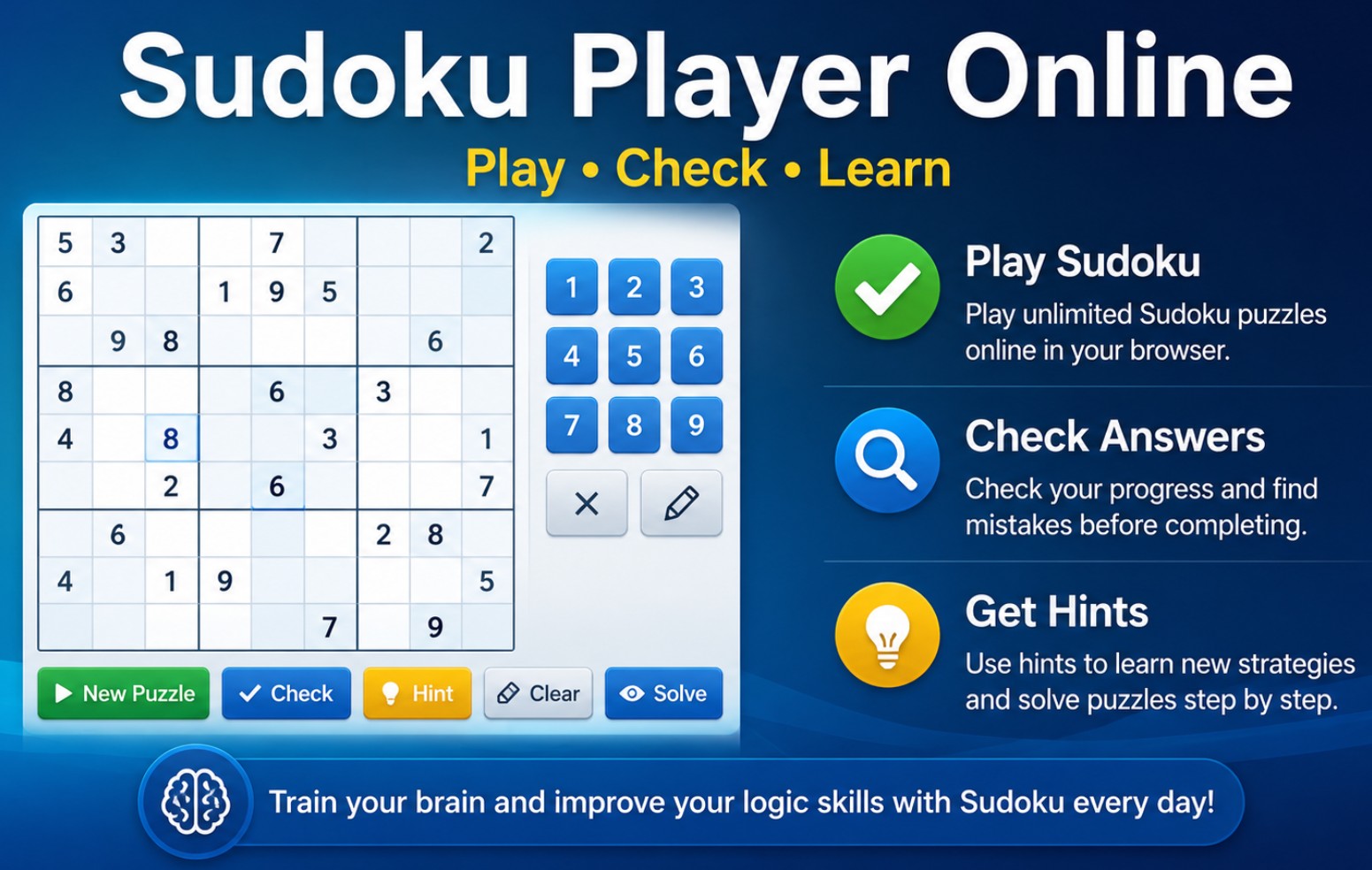
Sudoku Player Interface Preview
This preview shows the interactive Sudoku player in action. Generate a puzzle, fill the grid, check your answers, and use hints to continue solving step by step directly in your browser.
How the Online Sudoku Player Works
Playing Sudoku online with this player is simple and intuitive. Choose your grid, generate a puzzle instantly, and solve it directly in the interactive board using built-in tools for checking answers and getting hints.
1. Choose Grid Size
Select the Sudoku format you want to play. You can choose between 4×4 for beginners, 9×9 for classic gameplay, or 16×16 for advanced challenges.
2. Generate a Puzzle
Click the generate button to instantly create a new Sudoku puzzle. Each puzzle is unique and ready to solve immediately.
3. Fill the Empty Cells
Enter numbers into the empty cells while following Sudoku rules. Original numbers remain locked, and only empty cells can be edited.
4. Check Your Progress
Use the check feature to verify your inputs. It helps you identify mistakes early without revealing the full solution.
5. Use Hints When Needed
If you get stuck, the hint feature reveals the next correct move, helping you continue solving and learn Sudoku step by step.
6. Solve or Restart
You can complete the puzzle yourself or use the solve option to see the full solution. Clear your inputs anytime and try again.
Sudoku Grid Sizes Explained
The Sudoku player supports multiple grid sizes so you can choose the level of difficulty that matches your experience. Smaller grids are faster and easier to solve, while larger grids require more advanced logical thinking and longer solving time.
| Grid Size | Difficulty Level | Best For | Gameplay Style |
|---|---|---|---|
| 4×4 | Beginner | Kids, first-time players, quick practice | Simple and fast puzzles with basic logic |
| 9×9 | Standard | Daily Sudoku players and casual practice | Classic Sudoku gameplay used in most books and apps |
| 16×16 | Advanced | Experienced players and logic enthusiasts | Large grids with complex solving strategies |
Choosing the right grid size allows you to control how challenging the puzzle will be. Beginners usually start with smaller grids, while experienced players prefer larger formats that require deeper analysis and more advanced solving techniques.
Player Controls and What They Do
The Sudoku player includes several built-in tools that help you solve puzzles, check your progress, and continue playing without interruption. Each control is designed to support different stages of the solving process — from starting a new puzzle to verifying answers and learning from mistakes.
| Control | What It Does | When to Use It |
|---|---|---|
| Generate | Creates a new Sudoku puzzle for the selected grid size. | Use when starting a new game or trying a different difficulty. |
| Check | Verifies the numbers you entered and detects incorrect values. | Use when you want to validate your progress without revealing the solution. |
| Hint | Reveals one correct value in an empty cell. | Use when you are stuck and need help continuing the puzzle. |
| Clear | Removes all numbers entered by the player while keeping the original puzzle. | Use when you want to restart solving without generating a new puzzle. |
| Solve | Displays the full correct solution of the Sudoku grid. | Use to check the final result or learn how the puzzle is completed. |
These controls make the Sudoku player not only a game but also a practical learning tool. You can experiment with different solving approaches, check your answers step by step, and use hints to understand the logic behind each move.
Why Play Sudoku Online
Playing Sudoku online offers a fast and flexible way to enjoy puzzles without any setup. Instead of downloading apps or printing worksheets, you can generate and solve Sudoku puzzles instantly while using helpful tools that improve your solving experience.
No Downloads Required
Play Sudoku directly in your browser without installing apps or downloading files.
Works instantly on desktop and mobile devices.
Unlimited Puzzles
Generate as many Sudoku puzzles as you want with different grid sizes and difficulty levels.
No limits on how many games you can play.
Interactive Gameplay
Enter numbers directly into the grid, use hints, and check your progress in real time.
More convenient than paper-based Sudoku.
Great for Learning
Use hints and validation tools to understand Sudoku logic and improve your solving skills step by step.
Ideal for beginners and casual players.
Play Anytime
Start a quick puzzle during a break or play longer sessions whenever you want.
No setup, no waiting — just play instantly.
Train Your Brain
Sudoku helps improve logical thinking, concentration, and pattern recognition.
A simple way to practice mental skills daily.
Learning Sudoku with Hints and Validation Tools
This Sudoku player is not only a game but also a practical tool for learning how to solve Sudoku puzzles. Built-in features such as hints and validation allow you to understand the logic behind each move instead of relying on guesswork.
By combining interactive gameplay with step-by-step assistance, you can improve your solving skills over time. Instead of getting stuck or frustrated, you can use these tools to learn patterns, correct mistakes, and gradually develop more advanced Sudoku techniques.
How Each Feature Helps You Learn
| Feature | How It Helps | Learning Benefit |
|---|---|---|
| Hint | Reveals one correct value in the grid. | Shows the next logical step so you can understand how to continue solving. |
| Check | Validates your current inputs. | Helps identify mistakes early without exposing the full solution. |
| Clear | Resets your entries while keeping the puzzle. | Allows you to retry solving with a different approach. |
| Solve | Displays the completed puzzle. | Lets you review the final solution and compare it with your attempts. |
Using these features regularly helps build confidence and improve problem-solving skills. Over time, you will rely less on hints and begin recognizing patterns and strategies naturally while solving Sudoku puzzles.
Common Use Cases for the Online Sudoku Player
This online Sudoku player can be used in many different ways depending on your goals. Whether you want to practice daily, learn Sudoku from scratch, or simply enjoy a quick puzzle, the player adapts to different use cases and experience levels.
Daily Sudoku Practice
Play a new Sudoku puzzle every day to build consistency and improve your solving speed.
Ideal for short daily brain training sessions.
Learning Sudoku Basics
Start with smaller grids and use hints to understand Sudoku rules and logic step by step.
Perfect for beginners and first-time players.
Brain Training and Focus
Use Sudoku puzzles to improve concentration, memory, and logical thinking skills.
A simple way to keep your mind active.
Quick Puzzle Breaks
Solve a puzzle during a break without setup or preparation.
Great for short and relaxing sessions.
Advanced Sudoku Challenges
Play larger grids like 16×16 to test advanced solving strategies and logical thinking.
Suitable for experienced Sudoku players.
Classroom and Learning Activities
Use Sudoku as a simple educational activity for logic training and problem-solving exercises.
Useful for teachers and educational environments.
Online Sudoku vs Printable Sudoku
Sudoku puzzles can be played directly online or used in printable formats such as worksheets and puzzle books. Each format has its own advantages depending on how you prefer to play and what you want to achieve.
| Feature | Online Sudoku Player | Printable Sudoku |
|---|---|---|
| Start Playing | Instant — no setup required | Requires downloading and printing |
| Interactivity | Fully interactive grid with real-time input | Manual writing on paper |
| Hints and Help | Built-in hints and validation tools | No automatic assistance |
| Error Checking | Instant validation with the Check feature | Requires manual checking |
| Number of Puzzles | Unlimited — generate new puzzles anytime | Limited to printed pages |
| Best Use Case | Practice, learning, quick gameplay | Worksheets, books, offline solving |
The online Sudoku player is ideal for instant gameplay and learning, while printable Sudoku is better suited for offline use, classrooms, and puzzle books. Many players use both formats — playing online for practice and using printable puzzles for longer solving sessions.
Basic Sudoku Rules
Sudoku is a logic puzzle based on a simple set of rules. The goal is to fill the entire grid with numbers so that each row, column, and region contains all required values without repetition.
Row Rule
Each row must contain every number exactly once without duplicates.
Column Rule
Each column must contain every number exactly once without repetition.
Region Rule
Each sub-grid (region) must contain all numbers exactly once.
Every Sudoku puzzle starts with some numbers already placed in the grid. These numbers act as fixed clues and cannot be changed. Your task is to logically fill in the remaining empty cells while following all Sudoku rules.
The challenge comes from finding the correct number for each cell using logical deduction. As the grid becomes more complete, the remaining choices become more limited, helping you solve the puzzle step by step.
Tips for Better Sudoku Solving
Solving Sudoku becomes easier and more enjoyable when you apply simple strategies. Instead of guessing, use logical patterns and step-by-step thinking to complete the grid efficiently.
Start with Easy Sections
Focus on rows, columns, or regions that already contain many numbers.
Fewer empty cells make it easier to find the correct value.
Look for Missing Numbers
Identify which numbers are missing in a row or column and narrow down options.
This is one of the most basic and effective Sudoku techniques.
Use Elimination
Remove impossible values by checking existing numbers in rows, columns, and regions.
Helps you identify the only valid option for a cell.
Avoid Guessing Early
Try to rely on logic rather than guessing, especially at the beginning.
Logical solving leads to more consistent results.
Use Hints When Stuck
If you can’t find the next move, use a hint to continue solving.
Helps you learn without revealing the entire solution.
Check Your Progress
Use the check feature regularly to catch mistakes early.
Prevents small errors from affecting the entire puzzle.
Frequently Asked Questions About Playing Sudoku Online
If you are new to Sudoku or using an online Sudoku player for the first time, the following answers cover some of the most common questions about gameplay, features, and how the system works.
- Is this online Sudoku player free to use?
Yes. You can generate and play unlimited Sudoku puzzles directly in your browser without any cost or registration. - Do I need to install anything to play?
No installation is required. The Sudoku player works entirely online and runs directly in your browser on desktop and mobile devices. - What Sudoku grid sizes are available?
The player supports multiple grid formats including smaller beginner-friendly grids and larger layouts for more advanced Sudoku challenges. - Can I check my answers while solving?
Yes. The check feature allows you to validate your progress and detect mistakes without revealing the full solution. - How do hints work in the Sudoku player?
The hint feature reveals one correct value in the grid, helping you continue solving when you are stuck and learn the next logical step. - Can I play Sudoku on mobile devices?
Yes. The Sudoku player is fully responsive and works on smartphones and tablets as well as desktop computers. - What is the difference between this player and a Sudoku generator?
The player is designed for solving puzzles online, while a Sudoku generator is used to create printable puzzles, worksheets, and puzzle book pages.
These features make the Sudoku player a simple and flexible way to enjoy Sudoku online, whether you are practicing regularly, learning the game, or solving puzzles for fun.
How to Start Playing Sudoku Online
Getting started with Sudoku is simple. The online player is designed to let you begin solving puzzles immediately without setup, downloads, or preparation.
- Choose the Sudoku grid size that matches your skill level. Smaller grids are easier, while larger grids provide a more challenging experience.
- Click the generate button to create a new puzzle instantly and load it into the interactive grid.
- Start filling in the empty cells by applying Sudoku rules and logical reasoning.
- Use the check feature to verify your progress and catch mistakes early.
- If you get stuck, use hints to continue solving and learn the next step.
- Complete the puzzle or reveal the full solution to review the final result.
You can generate new puzzles at any time and continue playing as long as you want. Whether you are solving your first Sudoku or practicing advanced techniques, the player provides a fast and convenient way to play Sudoku online anytime.