













Step 1: Choose Your Word List
The first step in making a Word Search puzzle is choosing the vocabulary that will appear inside the grid. Your word list becomes the foundation of the entire puzzle because it affects the layout size, puzzle difficulty, educational purpose, and overall solving experience.
Most Word Search puzzles work best when the vocabulary follows a clear topic or theme. Educational puzzles often use science terms, geography vocabulary, spelling practice lists, reading exercises, holiday themes, sports topics, ESL vocabulary, and classroom review words.
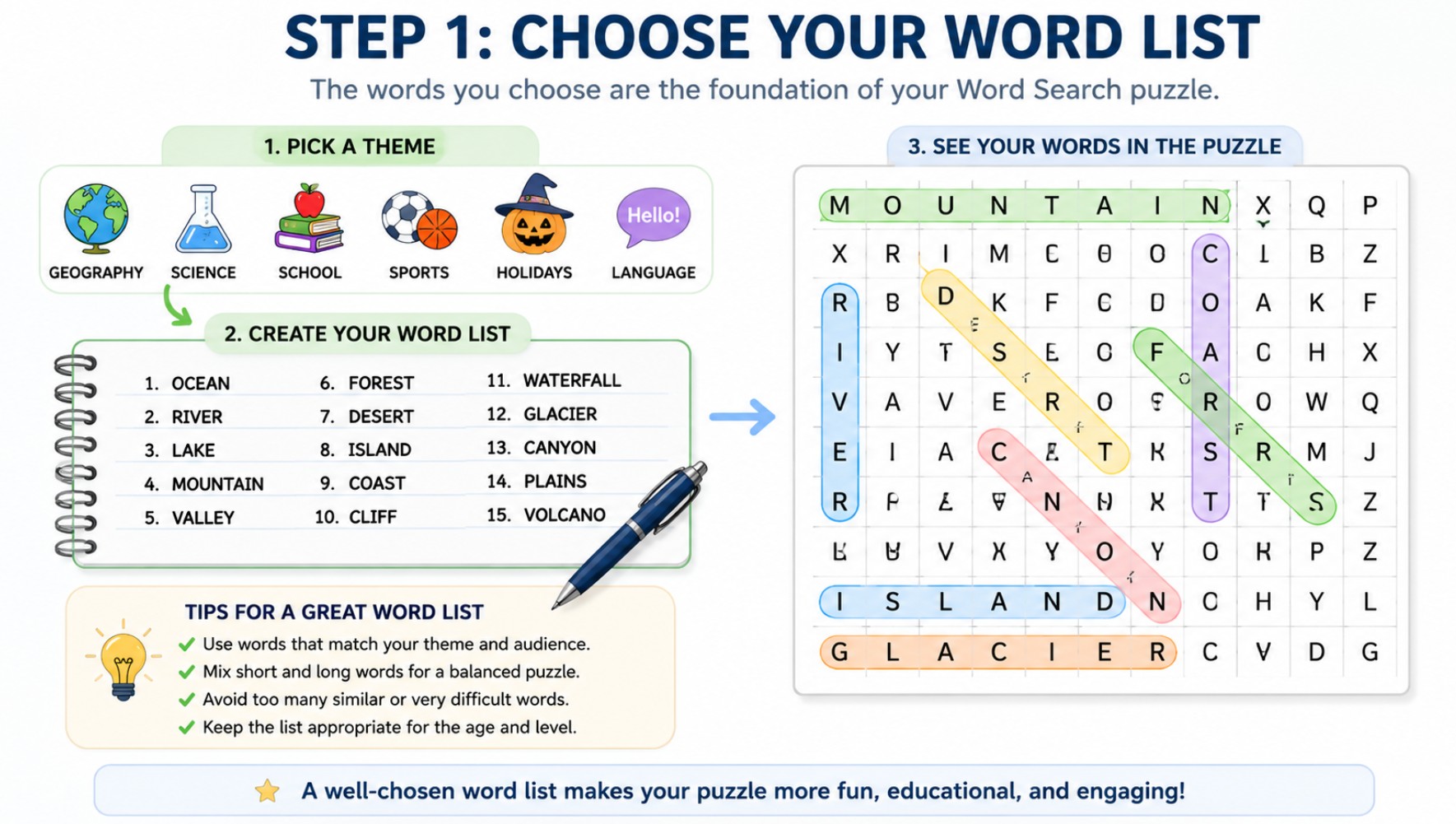
Choosing a Word List Before Building the Puzzle
A clear vocabulary theme helps create a more organized Word Search puzzle. Choosing balanced words before generating the grid improves readability, educational value, and overall puzzle quality.
A strong theme makes the puzzle easier to understand because players already know the type of words they are searching for. This improves readability and helps the activity feel more intentional and more engaging.
Word difficulty should match the intended audience. Younger children and beginner readers usually benefit from shorter and more familiar vocabulary, while older students and adults can handle longer and more advanced words.
The number of words also affects the puzzle structure. Smaller word lists work well for compact beginner puzzles, while larger lists may require bigger grids and more advanced layouts to maintain readability.
Educational Word Searches are often more effective when the vocabulary directly supports a lesson or learning activity. Repeated visual exposure to the same terms helps reinforce spelling patterns and vocabulary familiarity.
Choosing the right vocabulary at the beginning makes the next steps much easier because the grid size, puzzle directions, difficulty level, and printable layout can all be planned around the selected word list.
Good Word List Basics for Word Search Puzzles
Use a Clear Theme
Themed vocabulary creates a more organized and easier-to-understand puzzle experience.
Match the Audience
Choose vocabulary length and complexity based on the player’s reading level.
Balance the Word Count
Too many words may overcrowd the grid, while too few can make it feel empty.
A strong Word Search puzzle usually starts with a balanced vocabulary list. Even before choosing the grid size or puzzle directions, the quality of the word list already influences readability, educational value, and puzzle difficulty.
Clear themes make puzzles easier to understand because players immediately recognize the type of vocabulary they are searching for. Science words, geography terms, spelling lists, holiday vocabulary, sports themes, and language-learning topics all work well because the words share a common connection.
Audience level is also important. Beginner readers generally solve puzzles more comfortably when the vocabulary contains short and familiar words, while advanced players may prefer longer and more specialized terminology.
The total number of words should fit naturally inside the grid. Overcrowded layouts may become visually confusing, especially when many long words are forced into small puzzle sizes.
Balanced vocabulary selection improves the entire creation process because the grid layout, puzzle spacing, printable structure, and difficulty settings become easier to manage once the word list is properly prepared.
Step 2: Choose the Right Grid Size
| Grid Size | Typical Use | Difficulty Level |
|---|---|---|
| 8×8 | Young children and beginner puzzles | Easy |
| 10×10 | Basic classroom and vocabulary activities | Easy to Medium |
| 12×12 | General educational and printable puzzles | Medium |
| 15×15 | Advanced classroom and adult puzzles | Medium to Hard |
| 20×20 | Large printable and expert-level puzzles | Hard |
After preparing the vocabulary list, the next step is choosing a grid size that matches the number of words and the intended difficulty level. The grid controls how much space is available for word placement and strongly affects puzzle readability.
Smaller grids are usually better for beginner activities because players can scan the puzzle more quickly and recognize hidden words with less visual complexity. Larger grids create stronger challenges because the player must search through more letters and more possible word locations.
Grid size should also match the vocabulary length. Long words often require larger layouts to avoid overcrowding and awkward placement. If too many words are forced into a small grid, the puzzle may become visually confusing and difficult to solve comfortably.
Educational Word Searches commonly use medium-sized grids because they balance readability with puzzle challenge. Classroom worksheets and printable review pages often use layouts such as 10×10 or 12×12 since they fit comfortably on standard printable pages.
Advanced Word Search puzzles typically use larger grids combined with mixed word directions and denser vocabulary placement. These layouts require more concentration, pattern recognition, and careful scanning from the player.
Choosing the correct grid size early in the process helps create cleaner layouts, stronger readability, and a better balance between educational use and puzzle difficulty.
Step 3: Set the Puzzle Difficulty
After choosing the grid size, the next step is deciding how difficult the Word Search should be. Difficulty is not controlled by one setting only. It depends on the combination of grid size, word length, word count, direction options, spacing, and how densely the words are placed inside the puzzle.
For younger children and beginner readers, it is usually better to keep the puzzle simple. Use a smaller grid, shorter words, fewer directions, and a clear vocabulary theme. This helps players focus on recognizing words rather than struggling with a crowded or confusing layout.
For older students and adults, you can increase the challenge by using a larger grid, longer vocabulary, diagonal words, backwards words, and more hidden terms. These choices require stronger visual scanning and pattern recognition skills.
Puzzle density also affects difficulty. If many words are placed close together, the puzzle becomes more visually complex. This can be useful for advanced challenges, but it may make the activity harder to read for younger players or language learners.
A good Word Search difficulty level should feel challenging but still fair. Players should need to search carefully, but the puzzle should not become so crowded or complex that it feels frustrating before they can make progress.
When creating educational puzzles, match the difficulty to the learning goal. A vocabulary introduction activity should usually be easier, while a review puzzle after a lesson can be more challenging because students are already familiar with the words.
Step 4: Choose Word Directions
- Horizontal words are the easiest because they follow normal reading patterns
- Vertical words increase scanning difficulty and visual variety
- Diagonal placement creates more advanced puzzle layouts
- Backwards words make hidden vocabulary harder to recognize quickly
- Mixed directions produce the most challenging Word Search experience
Word directions determine how vocabulary is hidden inside the puzzle grid. This step has a major impact on puzzle difficulty because different placement styles change how players scan and recognize hidden words.
Horizontal placement is usually the simplest option because players naturally read from left to right. Beginner Word Searches often rely mostly on horizontal and vertical directions to keep the puzzle more accessible for younger readers and early vocabulary learners.
Adding diagonal words increases visual complexity because players must search beyond normal reading patterns. This creates more advanced solving experiences and makes the puzzle feel less predictable.
Backwards words create another layer of challenge because the vocabulary appears in reverse order inside the grid. Players must pay closer attention to letter sequences and scan more carefully across the puzzle.
Mixed-direction puzzles combine multiple placement styles together. These layouts are commonly used for advanced Word Searches, adult puzzles, and larger printable activities where the goal is to create a more difficult and time-consuming solving experience.
Choosing the right combination of directions helps balance readability and challenge while making the puzzle appropriate for the intended audience and educational purpose.
Beginner, Classroom, and Advanced Word Search Layouts
Beginner Layouts
Small grids, short words, and simple directions designed for easy solving.
Classroom Puzzles
Balanced layouts for vocabulary review, worksheets, and educational activities.
Advanced Layouts
Larger grids and mixed directions create more difficult challenges.
Expert Challenges
Dense vocabulary placement and complex scanning patterns for experienced players.
Different Word Search layouts work better for different audiences and goals. A puzzle designed for young children should not use the same structure as a large printable puzzle intended for adults or advanced classroom activities.
Beginner layouts usually focus on readability and simplicity. Small grids, shorter vocabulary, and horizontal placement help younger players recognize hidden words more comfortably without becoming overwhelmed by visual clutter.
Classroom Word Searches often use medium-sized grids because they provide a balance between educational value and puzzle difficulty. These layouts work well for spelling review, science vocabulary, geography activities, reading lessons, and printable worksheets.
Advanced layouts increase challenge by combining larger grids, diagonal and backwards directions, denser word placement, and more complex vocabulary. Players must scan more carefully because the puzzle contains more possible letter patterns and hidden word locations.
Expert-level Word Searches may also use crowded layouts with overlapping visual patterns that require patience, concentration, and stronger pattern recognition skills to solve successfully.
Understanding these layout styles helps puzzle creators choose structures that match the intended reading level, educational purpose, and overall solving experience of the Word Search activity.
Step 5: Place Words Inside the Grid
| Placement Check | Why It Matters |
|---|---|
| Words Fit Naturally | Prevents awkward placement and broken layouts |
| Spacing Remains Readable | Helps players scan the puzzle comfortably |
| Directions Are Balanced | Creates a more varied solving experience |
| Overlap Is Controlled | Increases challenge without causing confusion |
| Long Words Have Enough Space | Improves layout quality and readability |
Once the vocabulary list and puzzle settings are ready, the next step is placing the words inside the grid. This stage determines how organized, readable, and balanced the final Word Search puzzle will feel.
Words should fit naturally within the layout without forcing awkward spacing or overcrowding the puzzle. Long vocabulary terms usually need more open space, while shorter words can fit more flexibly inside the grid.
Balanced placement also improves the solving experience. If all words appear in similar locations or directions, the puzzle may feel repetitive and too predictable. Mixing placement styles creates stronger visual variety.
Controlled overlap between words can make the puzzle more interesting, but excessive overlap may reduce readability and create visual confusion, especially for younger players and beginner readers.
Educational Word Searches should prioritize clarity over extreme difficulty. Players should be challenged by the search process itself, not by messy or overcrowded layouts that make vocabulary difficult to recognize.
Careful word placement creates cleaner puzzle structure, stronger readability, and a more enjoyable solving experience for printable worksheets, classroom activities, educational puzzles, and recreational Word Search projects.
Step 6: Fill Empty Cells with Random Letters
After all hidden words are placed inside the grid, the remaining empty spaces must be filled with random letters. This step transforms the layout into a complete Word Search puzzle by blending the vocabulary naturally into the surrounding letter patterns.
Random filler letters are important because they prevent hidden words from standing out too clearly. Without filler characters, the puzzle would feel unfinished and players could identify the vocabulary too quickly.
Good filler patterns should look natural without accidentally creating extra recognizable words everywhere in the grid. If random letters form too many obvious patterns, players may become distracted or confused while solving.
Puzzle readability should also remain balanced after the grid is filled. Extremely crowded layouts with visually chaotic filler letters can make the activity feel frustrating instead of challenging.
Some Word Search creators intentionally use balanced letter distribution so the filler characters resemble normal vocabulary patterns rather than looking completely random. This often creates cleaner and more professional puzzle layouts for printable activities and educational worksheets.
At this stage, the Word Search is structurally complete. The vocabulary has been hidden inside the grid, the empty spaces have been filled, and the puzzle is ready for previewing, readability checks, and printable formatting.
Step 7: Preview and Check the Puzzle
- Confirm that every hidden word appears correctly inside the grid
- Check that words are not accidentally cut off or overlapping incorrectly
- Make sure the grid remains readable after filling empty cells
- Verify that the puzzle difficulty matches the intended audience
- Review spacing, printable margins, and page layout before export
Before exporting or printing the Word Search puzzle, it is important to preview the final layout carefully. Even a well-designed puzzle can contain placement mistakes, readability issues, or formatting problems if the grid is not reviewed before publication or distribution.
Start by checking that every vocabulary word appears correctly inside the puzzle. Missing letters, broken placement, or accidental overlaps can make the activity confusing or impossible to solve.
Readability should also be tested at the final stage. If the letters feel too crowded or visually chaotic, players may struggle to scan the puzzle comfortably, especially in printable classroom worksheets.
Puzzle difficulty should match the intended audience. Beginner activities should remain clean and readable, while advanced puzzles can support denser layouts and more complex scanning patterns.
Printable formatting is another important part of the preview process. Check margins, spacing, titles, answer pages, and overall page structure to ensure the puzzle prints cleanly on standard paper sizes.
Taking time to preview and review the puzzle helps prevent mistakes and improves the final solving experience for classrooms, educational activities, printable worksheets, and recreational Word Search projects.
Step 8: Add Finishing Details
Puzzle Title
Add a clear title that explains the topic, lesson, theme, or activity.
Word List
Keep the vocabulary list organized and easy to scan beside the puzzle.
Answer Key
Include a solution page when the puzzle is used for teaching or review.
Printable Layout
Check spacing, margins, page balance, and readability before final export.
Finishing details make the Word Search puzzle easier to understand and more useful for real activities. A clear title helps players immediately understand the theme, while an organized word list makes the solving process smoother.
Answer keys are especially helpful for teachers, parents, tutors, and anyone using Word Search puzzles for worksheets or educational review. They make it easier to check completed puzzles and verify that every hidden word was found.
Printable layout details also matter because the final puzzle should remain clean after export. Titles, word lists, puzzle grids, and answer pages should feel balanced on the page rather than crowded or visually disconnected.
These finishing steps help turn a basic generated grid into a complete Word Search activity that is ready for classrooms, homeschool lessons, tutoring sessions, printable worksheets, or casual puzzle games.
How to Make Word Search Puzzles for Different Uses
Word Search puzzles can be adapted for many different purposes depending on the vocabulary, layout, difficulty level, and printable formatting. The same basic creation process can support educational activities, classroom review, homeschool lessons, party games, printable worksheets, and recreational puzzle projects.
Classroom Word Searches usually focus on educational vocabulary connected to science, geography, reading, spelling, history, and language-learning topics. Teachers often use medium-sized grids with balanced difficulty so the puzzles remain readable while still reinforcing key lesson terms.
Homeschool activities often use printable Word Searches because they are easy to prepare and flexible enough for different reading levels. Parents can customize vocabulary around lesson plans, seasonal themes, or independent learning activities.
ESL and language-learning Word Searches usually work best with clear and familiar vocabulary. Simpler layouts help learners focus on spelling and recognition instead of struggling with overly difficult puzzle structure.
Party and entertainment Word Searches often use themed vocabulary connected to birthdays, holidays, weddings, travel, sports, movies, or special events. These puzzles are usually designed for fun rather than strict educational reinforcement.
Printable worksheet projects may require more careful formatting because the puzzles need clean spacing, readable grids, answer pages, and consistent printable structure across multiple pages.
Understanding the intended use of the Word Search helps puzzle creators make better decisions about vocabulary, difficulty, layout style, and printable presentation before exporting the final puzzle.
Frequently Asked Questions About Making Word Search Puzzles
| How do you make a Word Search puzzle? | Choose a vocabulary list, select a grid size, place words in different directions, and fill remaining spaces with random letters. |
|---|---|
| What is the best grid size for a Word Search? | Smaller grids work well for beginners, while larger grids create more advanced puzzle challenges. |
| What makes a Word Search difficult? | Difficulty increases with larger grids, longer words, mixed directions, and denser layouts. |
| Should Word Searches use diagonal words? | Diagonal placement is useful for increasing challenge, especially in advanced puzzles. |
| Are backwards words necessary? | No. Beginner puzzles often avoid backwards words to keep the activity easier to solve. |
| How many words should a puzzle contain? | The word count depends on grid size, vocabulary length, and the intended difficulty level. |
| Why are themes important in Word Searches? | Themes make puzzles feel more organized and help players understand the vocabulary context more easily. |
| Can Word Searches be used for education? | Yes. Word Searches are widely used for spelling, vocabulary review, classrooms, and worksheets. |
| Should a Word Search include an answer key? | Answer keys are very useful for teachers, tutors, printable worksheets, and classroom review. |
| What file formats are commonly used for export? | Many Word Search generators support PDF, PNG, and SVG printable export formats. |
| How do you improve puzzle readability? | Use balanced spacing, appropriate grid sizes, and avoid overcrowding the layout with words. |
| Are Word Searches suitable for adults? | Yes. Larger grids and advanced vocabulary can create challenging puzzles for adult players. |
Making a good Word Search puzzle involves balancing vocabulary, readability, puzzle difficulty, and printable structure. Small adjustments to the layout can significantly change the final solving experience.
Understanding how grid size, word directions, spacing, and vocabulary work together helps create puzzles that are more organized, more educational, and more enjoyable for different audiences and learning environments.
Common Mistakes to Avoid When Making a Word Search
Even simple Word Search puzzles can become difficult to use if the layout, vocabulary, or puzzle settings are not balanced correctly. Avoiding common design mistakes helps create cleaner, more readable, and more enjoyable puzzles for both educational and recreational use.
- Using too many long words inside a small grid
- Overcrowding the puzzle with excessive overlap
- Mixing unrelated vocabulary without a clear theme
- Creating layouts that are visually difficult to scan
- Making beginner puzzles too complex too early
- Forgetting to preview the printable layout before export
- Using tiny letters or poor spacing in printable worksheets
- Creating answer keys that are difficult to read
One of the most common problems is overcrowding the grid. Trying to place too many words inside a limited space often creates layouts that feel messy and difficult to solve comfortably.
Puzzle readability should always remain a priority. Even advanced Word Search puzzles should still feel visually organized enough for players to scan the vocabulary without unnecessary frustration.
Themes are also important because they help connect the vocabulary together. Random unrelated words may make the activity feel confusing or less engaging, especially in educational settings where context matters.
Printable formatting mistakes can also reduce puzzle quality. Small letters, weak spacing, crowded margins, and poorly organized answer pages may look acceptable on screen but become difficult to use after printing.
Taking time to review the puzzle before exporting helps identify these problems early and improves the final experience for classrooms, printable worksheets, educational activities, and recreational puzzle-solving.
Final Step: Turn Your Word List into a Finished Puzzle
Making a Word Search puzzle becomes much easier when you follow the process step by step. Start with a clear word list, choose a grid size that fits the vocabulary, set the right difficulty level, place the words carefully, fill the remaining cells, and preview the puzzle before exporting or printing it.
The strongest Word Search puzzles usually feel balanced. The vocabulary should match the theme, the grid should fit the word count, the directions should match the audience, and the layout should remain readable whether the puzzle is used digitally or printed as a worksheet.
For educational use, the best puzzles are usually built around a clear learning goal. A spelling list, science unit, geography topic, reading lesson, ESL vocabulary set, or holiday theme can all become stronger when the words are organized into a puzzle format that students can scan, solve, and review.
For printable activities, readability matters just as much as creativity. Clean spacing, clear titles, organized word lists, and optional answer keys help make the final Word Search easier to distribute, solve, and check.
Once the puzzle is complete, you can use it as a classroom worksheet, homeschool activity, tutoring exercise, party game, printable handout, vocabulary review page, or casual puzzle activity. The same basic process works for simple beginner puzzles and more advanced Word Search challenges.
By understanding each step of the process, you can create Word Search puzzles that are more organized, more readable, and better matched to the people who will actually solve them.